NDB and ADF simulator
NDB and ADF simulator
Track NDBs with the ADF and relative bearing indicator. The needle reports the station relative to your nose, so reading it is a skill, and a wind makes homing and tracking come apart.
7-day free trial, no card required. Includes Just Fly, the Intercept Trainer and the Hold Visualiser. Reverts to the free tier when it ends; you are never charged automatically.
How the trainer works
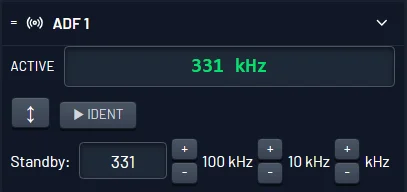
Set the ADF frequency and identify the beacon. The needle swings to point at the station.
A fixed card has 000 at the nose and does not rotate, so add the needle reading to your magnetic heading, subtracting 360 if the total runs past it. An RMI does that for you.
Apply a drift correction and hold a track rather than chasing the needle. The map shows the difference immediately.
Turn on simulated dip and the needle dips in the direction of turn while banked, then settles when you roll wings level. Assess it wings level or at rate one.
Included with Pro
- ADF receiver with a relative bearing indicator, plus RMI pointers on the HSI
- Simulated dip, adjustable from 0 to 20 degrees, so banked readings behave like the real thing
- Multiple NDBs to home to, track between and fix from
- Realistic wind, so homing and tracking visibly diverge
- Moving map breadcrumb trail to review the track you flew
- Just Fly is included in the 7-day cardless free trial
Learn the theory alongside the practice
Every guide below is free to read, with no account needed.
Frequently asked questions
Is there an NDB or ADF simulator I can use online?
Yes. Radio Navigator includes ADF and NDB navigation with a relative bearing indicator and RMI pointers, running in the browser with nothing to install. NDB navigation is a Pro feature; the free tier is a single VOR read on the HSI.
What is the difference between homing and tracking?
Homing means continuously turning to keep the needle on the nose, which in a crosswind curves you downwind into a long, bent path. Tracking means holding a drift-corrected heading so your path over the ground stays straight. The simulator makes the difference obvious because it models the wind.
Can I practise NDB navigation for free?
Not on the free tier, which has a single VOR and no NDB. NDB and ADF work is available in Just Fly, which is included in the 7-day cardless free trial.
How do I work out a magnetic bearing from the ADF?
Add the relative bearing shown by the needle to your magnetic heading, then subtract 360 if the total exceeds it. An RMI does this for you by rotating the card with your heading.
Does it simulate ADF dip?
Yes. Dip is on at 10 degrees by default and adjustable up to 20 degrees, because it varies from aircraft to aircraft. With it on, the needle dips in the direction of turn while you are banked and the dip disappears as you roll wings level, so the QDM or QDR is not correctly displayed mid-turn. Since dip is only known at a rate-one angle of bank, you assess the needle wings level or at rate one, and correct by levelling rather than by changing bank.
Open the trainer, or try the underlying skills free in the browser first.
7-day free trial, no card required. Includes Just Fly, the Intercept Trainer and the Hold Visualiser. Reverts to the free tier when it ends; you are never charged automatically.