How to track a VOR radial
By Rory Bennett (ATPL, FI: CPL, IR, ME, UPRT, FIC) · Published 15 May 2026
Direct answer
To track a VOR radial, tune and identify the VOR, then set on the OBS the magnetic course you intend to fly relative to the station. Tracking inbound on a radial means flying the reciprocal of the radial, so the 340° radial inbound is a course of 160° with a TO indication. Fly an intercept heading 30°–45° off the course until the CDI begins to move, then trim onto a wind-corrected heading that keeps the needle centred[2].
The radial-vs-course gotcha
A 45-second walkthrough of the most common VOR-tracking mistake, setting the radial value on the OBS when you should set the reciprocal. The full transcript is below the video.
Video transcript
What is a VOR radial?
A VOR radial is a magnetic bearing measured FROM the VOR ground station[1]. The 270° radial is the line extending due magnetic west from the station; the 090° radial extends due east. The full set of 360 radials defines the azimuth signal a VOR broadcasts.
A course is what you select on the OBS (omni-bearing selector) or HSI course pointer. It is the magnetic course you intend to fly relative to the station, not the radial number itself. The two values are different whenever you are flying inbound:
- Tracking a radial outbound: the course you set is the radial value itself. To fly outbound on the 090° radial, set 090° and look for a FROM flag.
- Tracking a radial inbound: the course you set is the reciprocal of the radial. To fly inbound on the 090° radial, set 270° and look for a TO flag.
Tune, identify, display
The pre-use sequence before any VOR can be relied on:
- Tune the VOR frequency on the NAV radio (e.g. 113.45).
- Identify the Morse identifier on the audio panel. The three-letter code must match the chart. Some devices offer visual idents.
- Display the VOR on the CDI or HSI you intend to use (NAV 1 vs NAV 2 source switch on most installations). Consider displaying an RMI to aid situational awareness, if available.
Setting the course on the OBS
With the VOR tuned, identified, and displayed, set the magnetic course on the OBS or HSI course pointer. Two cases:
- Inbound on a radial: set the reciprocal. The 340° radial flown inbound is a course of 160°. The 270° radial inbound is 090°. Confirm a TO flag.
- Outbound on a radial: set the radial value itself. The 340° radial outbound is a course of 340°. Confirm a FROM flag.
The TO/FROM flag is the single most useful sense check. A FROM flag with an inbound clearance, or a TO flag with an outbound, means the OBS is likely set wrong, or you're on the wrong side of the station. A HSI makes this slightly less of a problem as it will still look correct for fly left/right!
Reading the CDI deviation
With the correct course set, the CDI (course deviation indicator) shows how far you are off the selected course laterally. The standard scale is:
- Centred: on course.
- Full-scale deflection: 10° off course on a standard VOR CDI[2]. Different presentations have different numbers of dots. On a "2 dot" a side HSI, each dot will normally represent 5 degrees.
The needle deflection tells you which direction the course is, relative to your present position. If the needle is deflected left, the course is to your left and you need to turn left to intercept. A standard OBS CDI relies on you having set the course correctly: set the reciprocal of the course and the needle will reverse-sense: moving the wrong way for your turns. An HSI does not reverse-sense because the course pointer rotates with the heading, but you still cannot track effectively with the wrong course set. You will also look silly.
The TO/FROM flag
The TO/FROM flag indicates which side of the station you are on, relative to the selected course[2]:
- TO: you are on the side of the station from which flying the selected course will take you toward the station.
- FROM: you are on the side of the station from which flying the selected course will take you away from the station.
- OFF / red FLAG: the signal is unreliable; do not use for navigation.
When you cross overhead the VOR while tracking on a course, the TO/FROM flag flips from TO to FROM. That transition is the standard cue for station passage.
Intercepting the course
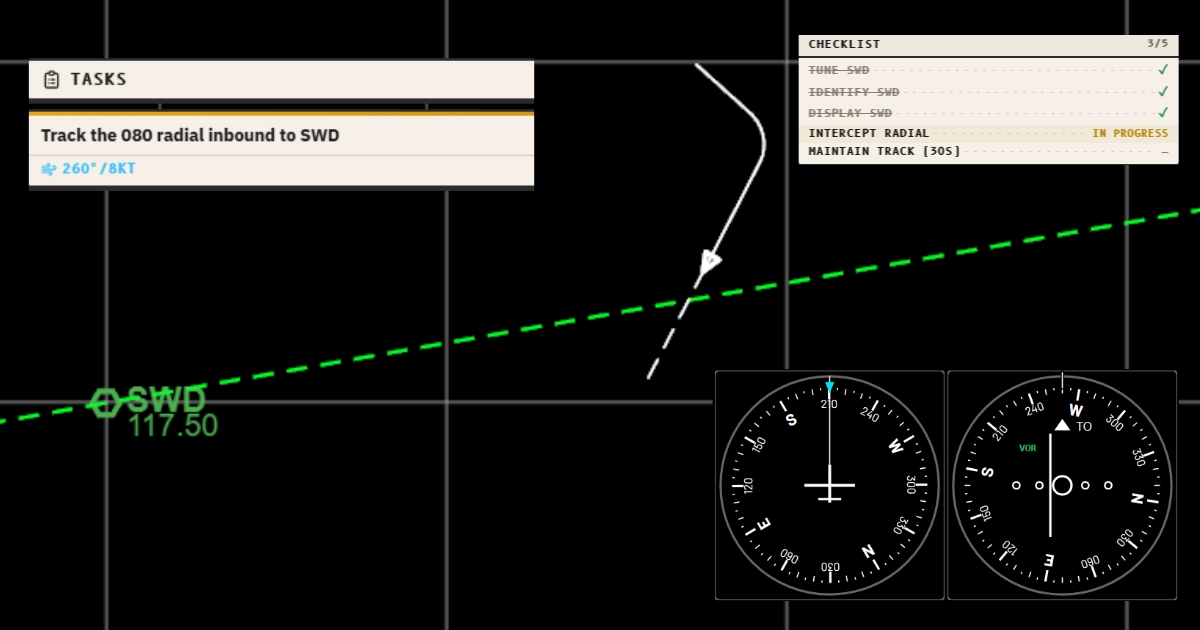
With the course set and the CDI showing a deflection, pick an intercept heading 30°–45° off the course on the side of the needle deflection[2]. Steeper intercepts (45°–60° or even up to 90°) are appropriate for larger deviations or at long range from the station; shallower intercepts (20°–30°) for small deviations close in.
- Read the CDI deflection. The course is on the side the needle is deflected to.
- Turn to an intercept heading 30°–45° off the course on that side. For inbound 270° with the needle a half-scale left, turn left to about 235° (35° off the course).
- Hold the intercept heading until the CDI begins to move toward centre.
- As the CDI approaches the centre, turn onto a wind-corrected heading that holds the course. Anticipate the turn; rolling out when the needle is already centred usually means an overshoot.
Watch: intercept walkthrough
Wind correction while tracking
Tracking a course to a VOR is, fundamentally, holding a wind-corrected heading. While flying the intercept heading calculate the wind correction angle using max drift and the clock code:
- Max drift = ( 60 ÷ TAS ) × wind speed . (degrees).
- Clock-code fraction: the angle from track to wind, expressed as a fraction of 60. 60°-90° = full Max Drift; 45° = 3/4 max drift; 30° = half max drift.
- Apply into wind: turn the heading toward the wind by the wind correction angle.
The full VOR simulator adds the OBS and CDI, a second VOR, ADF and DME.
Station passage and the cone of confusion
Directly above a VOR antenna the signal is unreliable in a roughly conical region extending upward. Inside this cone of confusion, the CDI swings unpredictably and the TO/FROM flag may flip ambiguously[2]. Procedure:
- Maintain heading through the cone. Do not chase the CDI.
- Time the passage if station passage is the required event (e.g. start a stopwatch for a procedure timing).
- Resume CDI tracking once clear of the cone, when the needle settles and the TO/FROM flag is steady.
Cone half-angle scales with altitude: higher altitude → wider cone in lateral terms.
Common mistakes
- Setting the radial value on the OBS when tracking inbound. Tracking inbound on a radial means flying the RECIPROCAL of that radial as your course. The 340° radial flown inbound is a course of 160°. Set 160° on the OBS for a TO indication. Set 340° and the needle will reverse-sense on a non-HSI CDI, and you will turn the wrong way.
- Skipping the Morse identification. A VOR can transmit an unmodulated carrier or a stuck audio signal that looks usable on the CDI but is unreliable. The identifier confirms the station is on-air and broadcasting the correct azimuth data. Listen for the three-letter ID before using the indication for navigation.
- Chasing the CDI with large heading changes. A swinging CDI is usually a sign that the wind correction is wrong, not that the course is wrong. Pick a wind-corrected heading and hold it; let the CDI tell you whether the correction is enough. Bracketing with small (5–10°) heading adjustments is faster than reacting to every needle movement. Make corrections AROUND a wind corrected heading, adjust the WCH if it no longer holds the course.
- Ignoring TO/FROM flag direction. The TO/FROM flag is the sense check. With course set to your inbound value the flag should read TO; with course set to your outbound value it should read FROM. A FLAG (red, OFF) indication means the signal is unreliable; stop using it for navigation until it clears.
- Forgetting the cone of confusion overhead the station. Within about 60° either side of the vertical above a VOR the signal becomes unreliable and the CDI will swing. Maintain heading through the cone, time the station passage, and resume CDI tracking once the needle settles.
Practise this in the simulator
Use the simulator to practise this procedure. You can change the wind and monitor the instruments in your browser.
7-day free trial, no card required. Includes Just Fly, the Intercept Trainer and the Hold Visualiser. Reverts to the free tier when it ends; you are never charged automatically.
More about the tools for this topic:
- VOR simulator lets you set a course, watch the CDI and the TO/FROM flag, and track the radial inbound or outbound in wind.
- HSI simulator puts the same tracking on a full HSI, where the deviation bar always sits on the side you must turn toward.
Check your understanding
Read each question. Decide on your answer. Then select Show answer to check it.
Show answer
Show answer
Show answer
Frequently asked questions
What is the difference between a VOR radial and a course?
A radial is a magnetic bearing FROM the VOR ground station. The 270 radial is the line extending due magnetic west from the station. A course is the track you intend to fly. To track a radial INBOUND, your course is the reciprocal of the radial (the 270 radial flown inbound is a course of 090). To track a radial OUTBOUND, your course is the radial itself. The OBS reads courses, not radials, which is the source of the most common student mistake.
How do I track a VOR radial inbound?
Tune and identify the VOR. Set the reciprocal of the radial on the OBS or course pointer (course inbound = radial + 180°, mod 360°). Confirm a TO indication. Pick an intercept heading 30° to 45° off the course toward the side of needle deflection, fly the heading until the needle starts to move, then turn onto a wind-corrected heading to maintain the course as the CDI centres.
What does the TO/FROM flag tell me?
It tells you which side of the station you are on, relative to the course you have selected on the OBS. With the correct inbound course set, TO means you are still approaching the station along that course; FROM means you have already passed it. If the flag is the opposite of what you expect when you set the course, the OBS is set wrong, usually the radial value instead of its reciprocal.
Why does my CDI reverse-sense if I set the wrong course?
A standard CDI (not an HSI) reverse-senses when the selected course is more than 90° from the line you are actually flying. With the radial value set instead of the reciprocal, the selected course is 180° from the actual flight direction, so the needle moves the wrong way relative to your turns. An HSI does not reverse-sense because the course pointer rotates with the heading, but you still cannot track effectively with the wrong course set - especially using an autopilot.
How do I apply wind correction when tracking a VOR radial?
Once established on the course with the CDI centred, drift will start to push you off. Calculate the wind correction angle from max drift and the clock code (max drift = 60 × wind speed ÷ TAS, multiplied by the fraction of the angle from track to wind over 60). Turn into wind by that angle and hold the heading. Bracket: if the CDI drifts in one direction, increase the correction by 5°; if it drifts back, take 5° off.
What is the VOR cone of confusion?
Directly above a VOR the signal is unreliable in a roughly conical region extending upward from the antenna. Inside this cone the CDI swings unpredictably and the TO/FROM flag may flip. Maintain heading through the cone, treat station passage by either the TO/FROM transition or by an off flag, and resume CDI tracking once you are clear.
Can I track a VOR radial in the simulator?
Yes. The free simulator at /free includes a fully simulated VOR with HSI CDI and TO/FROM flag, with wind. Set up a VOR, tune it, set a course, and fly the radial, with the same instruments and signals you would see in the aircraft. For procedurally generated tracking and intercept tasks with grading, the Intercept Trainer at /pro/intercept is the next step.
Sources
- International Civil Aviation Organization, Aeronautical Telecommunications, Annex 10 to the Convention on International Civil Aviation, Volume I (Radio Navigation Aids), current edition. Defines VOR signal characteristics, accuracy (±2° at 95%), and operational specifications. Cited by document number and section; not freely distributable.
- FAA Aeronautical Information Manual, Section 1-1-3, VHF Omni-directional Range (VOR). Current edition. faa.gov/.../chap1_section_1.html
- Federal Aviation Administration, Instrument Flying Handbook (FAA-H-8083-15B), Chapter 9 (Navigation Systems), VOR section. faa.gov/.../FAA-H-8083-15B.pdf
Related articles
This article is for study. Follow the instructions from your qualified flight instructor. Use current charts, procedures, and the regulations from your aviation authority.
© 2026 RHBA Radio Navigator. All rights reserved.