VOR simulator
VOR simulator
Get to grips with tracking inbound or outbound, no more TO or FROM confusion. Get that wrong and you get reverse sensing: the needle sends you the wrong way. Here you can see it happen, and fix it. Before you do it in the aircraft.
7-day free trial, no card required. Includes Just Fly, the Intercept Trainer and the Hold Visualiser. Reverts to the free tier when it ends; you are never charged automatically.
Fly it here. No account, no download
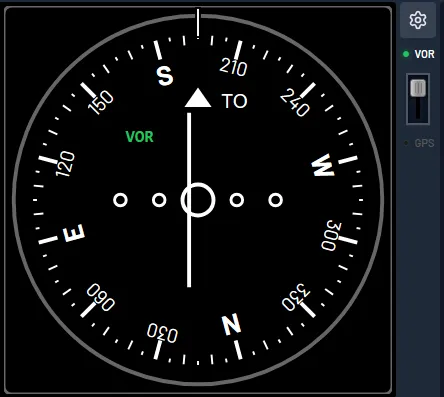
- Click Start. The aircraft begins established on the inbound radial to the FRE VOR.
- The course is already set to the inbound track; the CDI shows how far left or right of it you are.
- Keep the needle centred with small heading changes toward the bar, allowing for the wind.
- Watch the TO/FROM flag: it reads TO inbound and flips to FROM as you pass over the station.
How the trainer works
Set the VOR frequency and confirm the ident, exactly as you would in the aircraft.
Outbound the course you set IS the radial. Inbound it is the reciprocal. Set the radial value while tracking inbound and the needle reverse-senses, telling you to turn away from the course rather than toward it.
Adjust the WCA until the needle stays centred. The moving map shows the track you are actually making good, so you can see whether the correction is holding.
Included with Pro
- Two VOR receivers: tune, identify and track any station
- OBS and CDI, plus a full HSI and RBI
- Radial tracking inbound and outbound, with TO/FROM as the sense check that you set the course and not the radial
- Fly directly over the station and see the needle turn unreliable in the cone of confusion
- Realistic wind, so bracketing a radial is a genuine skill
- Moving map with track, trail and wind drift on the chart
- Included in the 7-day cardless free trial
Learn the theory alongside the practice
Every guide below is free to read, with no account needed.
Frequently asked questions
Is there a free VOR simulator?
The free tier gives you one VOR read on a full HSI, in 5-minute sessions with no account. The separate OBS and CDI instruments, a second VOR, ADF and DME are Pro, which starts with a 7-day cardless free trial.
What is the difference between a radial and a course?
A radial is always measured outbound from the station. The course you set on the OBS is the track you intend to fly, which is the reciprocal of the radial when you are tracking inbound. Mixing the two up is the single most common VOR error.
Can I practise VOR tracking with wind?
Yes. Wind is modelled realistically, so holding a radial needs genuine drift correction and bracketing rather than just pointing at the needle. It is modelled in the free tier too.
What intercept angle should I use?
Start with a 90 degree intercept. It is the easiest to judge and fly. As you get more confident, work down to a 30 degree intercept, which needs finer timing.
What does Pro add?
Pro adds the OBS and CDI instruments, a second VOR, ADF, DME and simulated GNSS, RMI bearing pointers, time acceleration up to 20×, and the graded Intercept, Holding, Position Fix and Procedure Turn trainers.
Open the trainer, or try the underlying skills free in the browser first.
7-day free trial, no card required. Includes Just Fly, the Intercept Trainer and the Hold Visualiser. Reverts to the free tier when it ends; you are never charged automatically.